Convert a Bank Statement PDF to Excel
Turn a PDF statement from any bank into a clean Excel, CSV, or JSON file — date, description, amount, and balance in their own columns. Free, no signup required.
How do I convert a bank statement PDF to Excel?
Download the statement PDF from your bank's online banking, drop it into the upload box on this page, and download the Excel file within seconds. Every transaction is split into date, description, amount, and balance columns — no templates, no macros, no copy-paste. Both text-based and scanned PDFs work. The first 50 pages each month are free and no credit card is required.
Download your account statement as a PDF from your bank's online banking or mobile app.
Drag and drop the PDF into the upload box on this page, or pick the file — no signup needed.
Date, description, amount, and balance columns are detected automatically; download the Excel, CSV, or JSON output.
Try It Now — Upload Your Statement
Drop PDF here or click to upload
Max 20 MB · Text-based or scanned PDF
What You Get
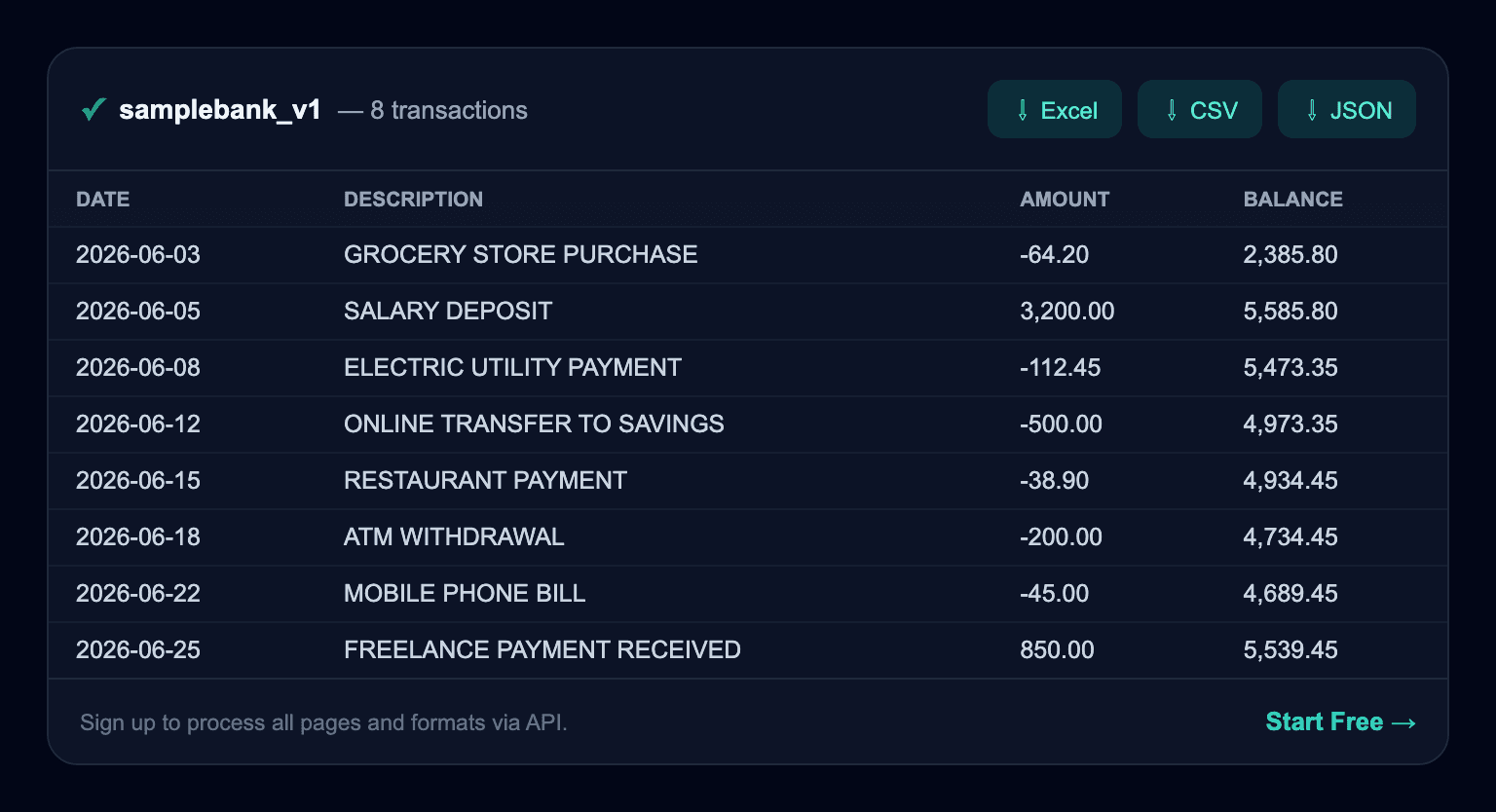
Illustrative example with sample data — your actual result will reflect your own statement.
Formats & Coverage
Excel (.xlsx)
Ready for accounting and spreadsheet workflows.
CSV
Plain-text columns that import into any tool.
JSON
Structured output for APIs and automation.
Scanned PDF
Statements with no text layer are handled with OCR.
Why Not Copy-Paste?
- Text copied from a PDF lands in one cell — columns collapse and numbers become text.
- On multi-page statements, headers and footers get mixed into the data.
- Negative amounts, currency symbols, and thousands separators all have to be cleaned by hand.
- A converter does all of this automatically and checks every row against the balance chain.
Frequently Asked Questions
How do I convert a bank statement PDF to Excel?
Download the statement PDF from your bank, drop it into the upload box on this page, and download the .xlsx file in seconds. Every transaction is split into date, description, amount, and balance columns. No templates, no macros, no copy-paste.
Is this converter really free?
Yes. The first 50 pages each month are free and no credit card is required. You can use the demo without creating an account. For higher volume there are monthly plans (from $25, 20% off billed yearly) and one-time page packs.
Which banks does it support?
Statements from any bank in any country. There is no fixed list of banks — the engine extracts known formats instantly and works out the column structure itself when it sees a layout it doesn't recognise, then learns it.
Do scanned (image) PDFs work?
Yes. Scanned statements with no text layer are processed with OCR. It can take a little longer than a text-based PDF, but you get the same Excel/CSV/JSON output.
What output formats are available?
Excel (.xlsx), CSV, and JSON. Developers can also pull the same structured data straight from the REST API.
Is my data safe?
The PDF you upload is deleted automatically within 14 days at the latest and never used to train any AI model. See the Security page for detail.
How is accuracy checked?
Every row's amount is verified against the running-balance chain from one balance to the next (opening + movements = closing). Rows where the chain doesn't hold are flagged, so silent errors get caught.